SSTables: Sorted String Tables
Concept. An SSTable is an immutable file of key-value pairs sorted by key, written once and never modified. It's the building block for write-heavy stores like LSM trees.
Intuition. When Spotify needs to record 1 million listen events per second, writing each one to a sorted on-disk B+Tree is too slow, because every write triggers a rebalance. Instead, the system buffers writes in RAM until it has a chunk, then flushes a sorted immutable file to disk. That file is an SSTable.
Anatomy of an SSTable
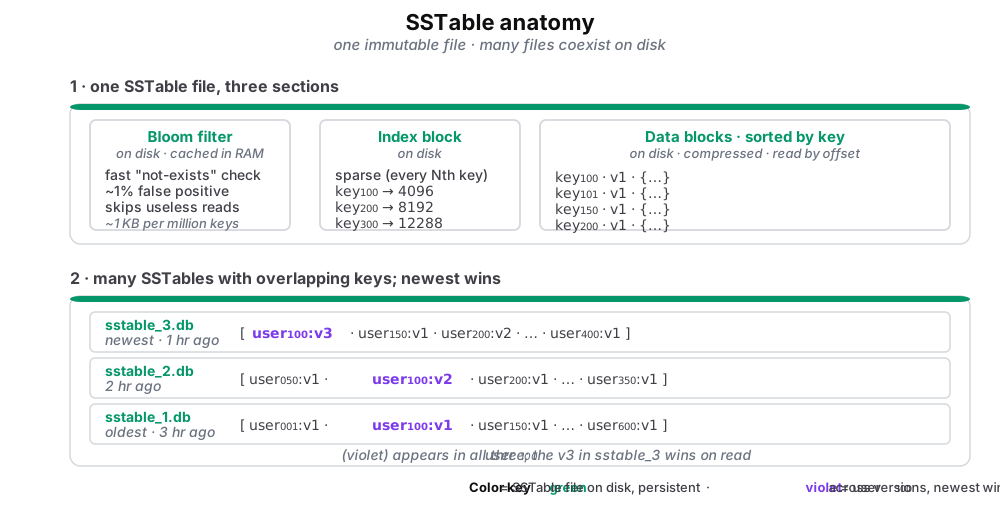
Figure 1. SSTable anatomy. One immutable file, plus how many files coexist on disk.
- Bloom filter (in the SSTable file, cached in RAM): a compact bitmap. Answers "is key K in this file?" in O(1): definitely-no, or maybe-yes. About 1 KB per million keys, lets the database skip a wasted disk read.
- Index block (disk): sparse, with every Nth key plus its byte offset. Binary-search to find which data block holds your key.
- Data blocks (disk): the actual rows, sorted by key, compressed. Read by following the byte offset from the index.
- Multiple SSTables coexist: the same key can live in several files. Live example: user100 appears in all three with versions
v1,v2,v3. The newest (v3insstable_3.db) wins on read.
Each SSTable is a single file with three sections laid out in order. The caption above lists what each section does. (Recall Bloom filters from Module 2 for how they work and their false-positive behavior.)
Multiple SSTables coexist on disk. A background compaction process eventually merges older files together to throw away obsolete versions.
How Databases Use SSTables
Three operations show up in any system that uses SSTables:
-
Flush. Convert an in-memory buffer of pending writes into a sorted, immutable file on disk. One sequential write per flush.
-
Read. Consult the bloom filter, binary-search the sparse index, and read the target data block. Three steps, mostly from cache.
-
Compact. K-way merge a set of older SSTables into one larger file, keeping the newest version of each key and dropping deleted entries.
Some databases use SSTables as a standalone storage format (notably older versions of HBase and many analytics stores). Others layer them into a larger structure, which is where LSM trees come in on the next page.
Algorithm
Algorithm · SSTable: Flush, Read, Compact
Flush(memtable):                    // RAM buffer is full
    sorted = sort(memtable)         // sort by key
    write(bloom_filter)             // for quick "not exists"
    write(sparse_index)             // every Nth key → offset
    write(sorted_data)              // the actual key-values
    write(footer)                   // min_key, max_key, size

Read(sstable, key):
    if not bloom_filter.contains(key):
        return None                 // quick reject, no disk read
    offset = binary_search(index, key)
    block  = read_block(offset)
    return linear_search(block, key)

Compact(sstables):
    merged = k_way_merge(sstables)  // keep newest version per key
    return write_new_sstable(merged)