UNDO and REDO: The Backbone of Transaction Management
Concept. UNDO reverses changes from transactions that didn't commit before the crash; REDO reapplies changes from transactions that did commit but whose data pages hadn't been flushed yet. Both decisions are read straight off the log.
Intuition. At crash time, Mickey's Premium purchase was uncommitted (the log shows charged $9.99 but no COMMIT), so recovery UNDOes it and refunds his card. Minnie's purchase was committed (the log shows COMMIT), but her account-table page hadn't been flushed to disk yet, so recovery REDOes it and marks her Premium. Same crash, opposite actions, decided by what the log says.
From the previous page we know the log stores every change as (old_value, new_value). This page is about the two recovery operations that read those entries: UNDO (rolls back uncommitted work) and REDO (reapplies committed work that didn't flush).
↩ UNDO Operation
Purpose: Reverse a change, restore original value
Uses old_value: Set variable back to what it was before
When: Transaction aborts or needs to be rolled back
UNDO: seat_id=42, buyer_id: zx198 → ab12
↪ REDO Operation
Purpose: Re-apply a change, set new value
Uses new_value: Set variable to the updated value
When: Transaction commits or needs to be re-applied after crash
REDO: seat_id=42, buyer_id: ab12 → zx198
UNDO/REDO in Action
Consider the mechanics of a ticket resale transaction:
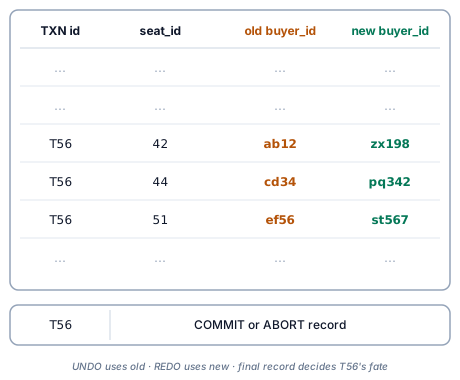
What T56's log entries reveal:
-
Every change logs both
oldandnewvalues. -
UNDO leverages old values to roll back changes.
-
REDO uses new values to reapply changes.
-
The COMMIT or ABORT record is the final arbiter of the transaction's fate.
Next
Write-Ahead Logging → UNDO and REDO only work if the log entry is on disk before the data change is. WAL is the discipline that guarantees that ordering.