Storage Layout: Row vs Columnar
Concept. A storage layout is the on-disk arrangement of a table. Row-oriented stores all columns of one row together; column-oriented stores all values of one column together.
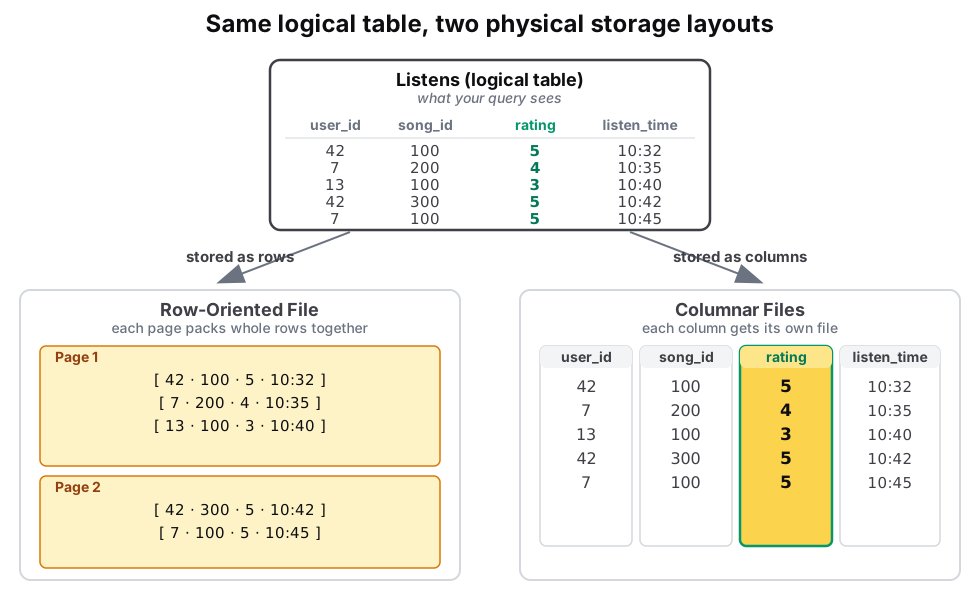
Intuition. Row-oriented Listens packs each listen (listen_id, user_id, song_id, rating, listen_time) as one chunk on disk. Column-oriented stores all the user_id values together, then all the rating values, then all the listen_time values. "Average rating across a billion listens" reads one column instead of every row.
How Tables Live on Disk
Two layers between your table and the operating system:
-
OS Files. The OS's basic building blocks: unstructured bytes with no rules.
-
DbFiles. The database's tailored files, packed into fixed 64 MB pages. Every table you query lives as a DbFile.
-
Why pages? When you query, the database hauls in whole 64 MB chunks, not piecemeal records. I/O devices are slow, so bulk operations (one 64 MB read vs. 2,000 separate 32 KB reads) keep cost in check.
Inside a 64 MB Page: The Storage Layout Question
Three options for how to lay out the bytes inside a page:
-
Row storage. Pack all columns of one row together.
-
Columnar storage. Pack all values of one column together.
-
Hybrid storage. Column-grouped within row-groups (covered separately).
The first two are the fundamental contrast. Same data, two layouts, very different I/O for the same query:
Row-Oriented: The Slotted Page
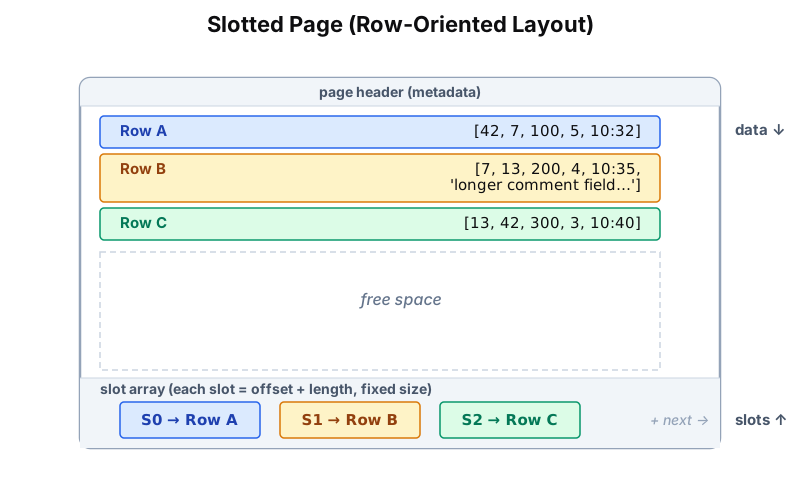
A 64 MB row-oriented page uses a slotted page design to handle variable-length rows and the fragmentation that updates create.
Columnar: Compression at Scale
Same idea inverted: a page holds many values for a single column. Sequential bytes are all the same type, and that's exactly what compression algorithms exploit aggressively.
More data means better compression. Take Spotify's Listens table:
| Column | Small scale (T(R) = 9) | Massive scale (T(R) = 100M) | Compression technique |
|---|---|---|---|
| user_id | 36 B → 6 B (83 %) | 400 MB → 8 MB (98 %) | RLE. Runs of repeated user_ids. |
| song_name | 36 B → 14 B (61 %) | 400 MB → 50 MB (88 %) | Dictionary. Top 1K songs cover 80 % of plays. |
| rating | 36 B → 18 B (50 %) | 400 MB → 40 MB (90 %) | Quantization. 0.1 precision fits in 1 byte plus a NULL bitmap. |
| listen_time | 180 B → 60 B (67 %) | 2 GB → 200 MB (90 %) | Delta. Binge sessions compress 10:1. |
| Total | 432 B → 98 B (77 %) | 4.8 GB → 298 MB (94 %) | More data means more repetition. |
The Scaling Law: small datasets compress to ~77 %; massive datasets to 94 %+.
Why: repetition patterns emerge at scale. Popular songs played millions of times, active users with thousands of listens, predictable timestamp sequences. Rows can compress too, but not nearly as much (mix of types per row defeats most encoders).
This is why BigQuery, Snowflake, and Redshift can scan petabytes efficiently. They're reading highly compressed columnar data, not just columnar data.
Key Takeaways
-
Layout matters. How you organize bytes inside a 64 MB page dictates I/O cost.
-
Query pattern picks the layout. OLTP (point lookups, updates, inserts) favors row (PostgreSQL, MySQL). OLAP (aggregates, scans, append-only) favors columnar (BigQuery, Snowflake).
-
Columnar plus compression plus distribution equals scanning petabytes in seconds. This is the foundation of modern analytics.
Next
Case Study 3.1: BigQuery Scaling → The canonical columnar-analytics system that powers Google and is the blueprint for modern cloud data warehouses.