Problem Solving: The Taylor Swift Ticket Disaster
The Taylor Swift case
Learn from a real-world transaction bottleneck and the practical optimization strategies that scaled it to millions of users. Reducing lock contention and improving user experience through smart system design.
The Core Problems
The Taylor Swift Eras Tour ticket sales on Ticketdiaster.com creates massive concurrent load.
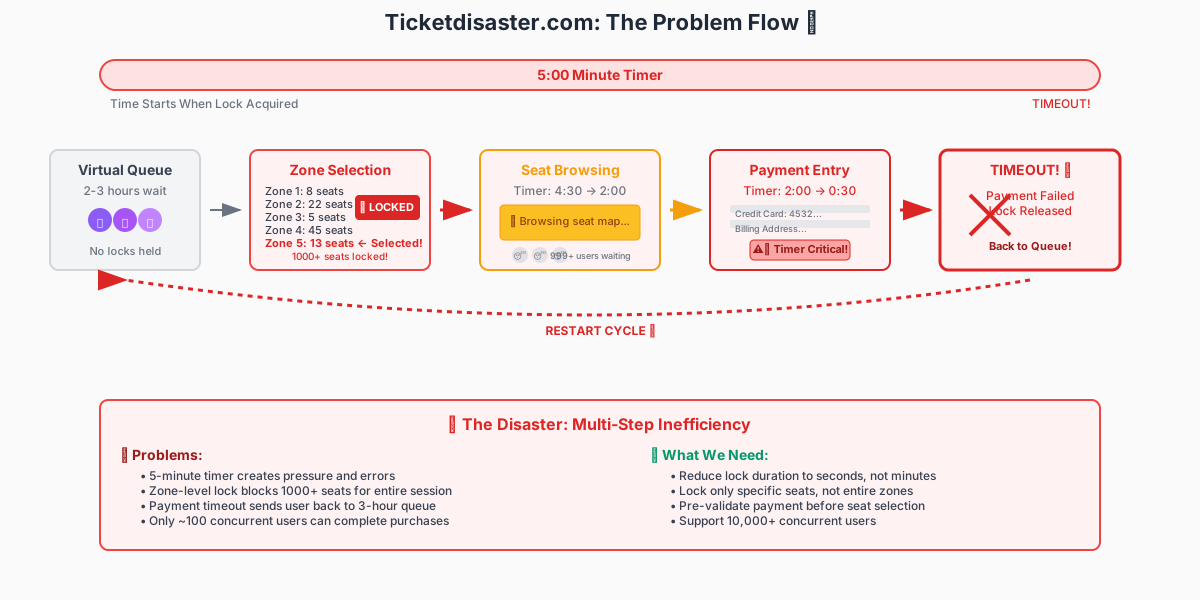
Figure 1. The Ticketdisaster.com checkout flow under Eras Tour load. Each step adds latency and lock contention; the three worst bottlenecks come next.
Here are the three critical bottlenecks from this disaster:
Queue Management Disaster
Fan Experience: Hours waiting in virtual queues behind thousands of other fans
System Reality: Poor queue management with no priority handling or smart routing
Critical Question: How can the app show available seats and count for an Event? What data should it read?
Answer: Real-time queries with thousands of concurrent users create bottlenecks
Lock Contention Hell
Fan Experience: Group booking hassles, constant retries across multiple zones
System Reality: Zone-level locks blocking thousands of seats for single user sessions
Critical Question: If user doesn't like the 1st zone result, what do they need to do?
Answer: Retry with different zones, creating additional load and longer lock duration
Payment Flow Blocking
Fan Experience: Rushed payment review leading to errors and failed transactions
System Reality: Locks held during entire payment process (5-10 minutes per user)
Critical Question: Can you count reserved seats for other users before payment completes?
Answer: This is the core problem! Reserved-but-not-purchased seats create uncertainty
The Smart Solutions: Ticketsfaster.com
You could invent new locks. OR here's how to redesign the user flow system to handle 100x more load:
Strategy 1: Redesign User Flows to Reduce Lock Duration
Before: Long Lock Sessions
Workflow:
• Enter virtual queue
• Wait for turn (hours)
• Select zone → Lock entire zone (1000+ seats)
• Browse available seats (5+ minutes with lock held)
• Enter payment info (more time with lock)
• Complete purchase or timeout
• Release lock
Lock Duration: 5-10 minutes
Seats Blocked: 1000+ per user
Concurrent Users: ~100 max
After: Quick Lock Sessions
During Virtual Queue (no locks needed):
• View approximate seat availability by zone
• Pre-fill payment information
• Make tentative zone preferences
When Your Turn Arrives (minimal lock time):
• Quickly select specific seats from preferred zone
• Lock only chosen seats (1-8 seats, not 1000)
• Confirm pre-filled payment (30 seconds)
• Complete purchase → Release lock immediately
Lock Duration: 30 seconds
Seats Blocked: 1-8 per user
Concurrent Users: ~10,000 max
- Speed: 90% faster. Lock time reduced from minutes to ~30 seconds.
- Capacity: 100× more concurrent users (~100 → ~10,000).
Key Insight: Move browsing and decision-making outside of critical lock sections.
Strategy 2: Higher-Resolution Locking
Before: Zone-Level Locks
Lock Scope Comparison:
• Entire Zone: 1,000 seats locked → 999 users blocked
• Section Block: 100 seats locked → 99 users blocked
Problem: Massive lock contention
Result: Only ~100 concurrent users
Issue: Locking 1000 seats blocks 999 potential buyers
After: Seat-Level Locks
Lock Scope Comparison:
• Individual Seat: 1 seat locked → 0 users blocked
• Seat Group: 2-8 seats locked → 1-2 users blocked
Solution: Minimal lock contention
Result: ~10,000 concurrent users
Benefit: 100x more users can browse different seats simultaneously
- Lock scope: 99% reduction. From 1,000 seats to 1–8.
- Wait time: 95% faster. Almost no blocking.
Key Insight: Higher-resolution locks mean lower contention and better performance.
Strategy 3: Fallback to Async Timestamp-Based System
If too much load, have a backup async approach.
Before: Real-Time Blocking
Process: Users wait hours in virtual queues while holding database locks during browsing and payment processing. Each transaction blocks seats for 5+ minutes.
Experience: 3-hour queue waits
Scalability: ~100 concurrent users
Problem: Synchronous processing creates massive bottlenecks
After: Async Confirmation
Process: Users submit ticket requests instantly with timestamps. Background systems process requests in order and send email confirmations within 60 minutes. No blocking waits.
Experience: 60-minute confirmations
Scalability: ~50,000 concurrent users
Benefit: Users submit requests instantly, get confirmation via email
- Response time: 99% faster. Submission in 60 seconds vs. a 3-hour queue wait.
- Scalability: 500× more concurrent users (~100 → ~50,000).
Key Insight: When blocking is unavoidable, make waits predictable and transparent.
Key Takeaways
Lock Granularity Matters
Use the smallest possible lock scope. Lock individual records, not entire tables or large ranges.
Rule: Prefer seat-level over zone-level locks when you have hundreds of items per group.
Minimize Lock Duration
Redesign user workflows to reduce the time locks are held. Pre-validate, then lock briefly for the final operation.
Rule: Move browsing and decision-making outside of critical sections.
Consider Async Patterns
For high-contention scenarios, timestamp-based queuing can provide better user experience than real-time locking.
Rule: When blocking is unavoidable, make the wait predictable and transparent.
Ready to optimize your own systems?
Apply these principles to any high-contention scenario: inventory management, seat reservations, limited product launches, or financial transactions.