Case Study 2.1: How UberEats and Google Maps Accelerate Geo Queries with RAM Hashing
Concept. Geo-hashing converts a 2-D (lat, lng) coordinate into a 1-D string, turning "find drivers within 2 km" into a one-IO hash lookup instead of a 10-million-row table scan.
Intuition. Stamp every driver with a 5-character grid code based on where they're parked. Same code = same neighbourhood. "Drivers within 2 km" becomes a substring match on a string column instead of distance arithmetic across 10 million rows.
The Mechanics of Speeding Up Geo Queries
Objective: Master the art of building indices on multidimensional data.
In the world of food delivery and mapping, speed is a necessity. The ability to group nearby orders and assign them efficiently to drivers can make or break operational success. Imagine a database of 10 million active orders with coordinates like these:
orders = [(37.788022, -122.399797), (37.788122, -122.399797), (37.788022, -122.398897)]
The IO Nightmare: If an Uber driver opens their app and you want to find orders within 2 miles, running a geometric ST_Distance(driver_loc, order_loc) calculation across 10 million rows would require a full table scan. That is 10 million IO operations. During a lunch rush, this would instantly crash the database CPUs.
We need a way to turn a complex 2D geometric search into a simple 1D Hash Lookup that costs exactly 1 IO.
Geo Hashing
Geo hashing converts geographic locations into compact strings of letters and digits. Here's the breakdown:
-
Grid Division: The earth is divided into a grid of squares, each tagged with a unique geo hash.
-
Recursive Sub-division: Each square is further divided into smaller squares until the desired precision is achieved.
Example: Take (37.788022, -122.399797) with a 5-character precision (~2.8 km). The geo hash is "9q8yy". This string allows for rapid identification of nearby locations by slight variations.
Hexagon-based Hashing (Uber H3)
Enter hexagon-based hashing with H3 cells, a more refined approach. H3 uses hexagons to partition the earth's surface, offering various resolutions (see H3 vs S2 comparison).
Why Hexagons?
Hexagons ensure uniform distance from the center to all neighboring centers, making them perfect for radius-based searches.
Uber H3 in Practice:
At zoom level 8, close locations share the same cell ID. At zoom level 12, even buildings on a campus might differ by just a few characters.
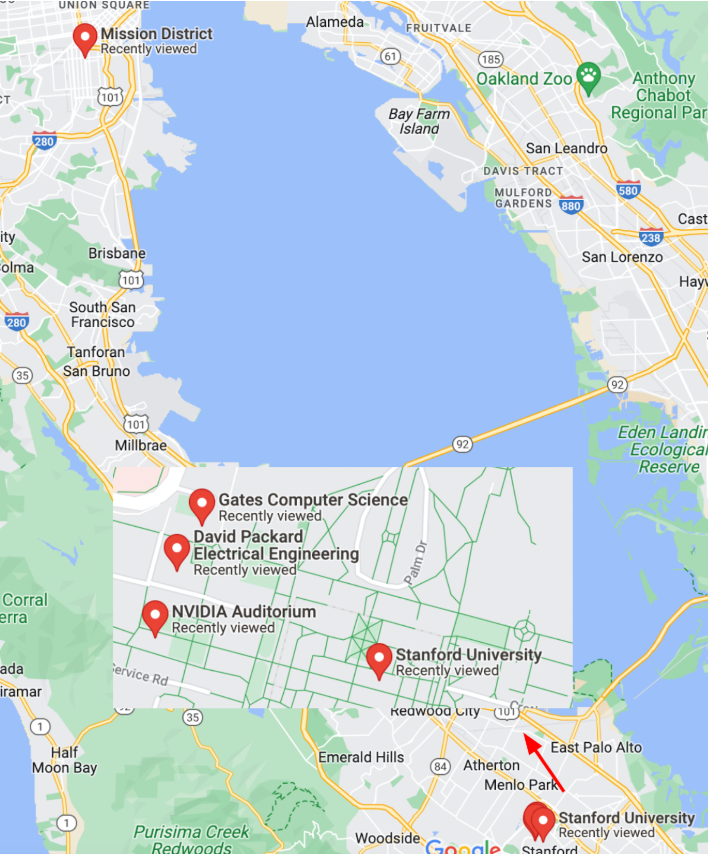
Click to expand: Map of SF and Stanford locations
Here's how h3.geo_to_h3 converts coordinates into hexagonal cell IDs:
import h3
# lat/lngs FROM SF mission, Stanford NVidia, Packard, Gates Buildings
locations = [(37.788022, -122.399797), (37.428226, -122.174722),
             (37.429749, -122.1735490), (37.429761, -122.173290)]

for zoom IN [8, 12]: # zoomlevels 8 AND 12 (imagine the +/- IN map zoom)
    for l IN locations:
        cell_id = h3.geo_to_h3(l[0], l[1], zoom)
        print(f"@zoom[{zoom}]: {cell_id}")
Output:
@zoom[8]: 88283082a1fffff
@zoom[8]: 8828347417fffff
@zoom[8]: 8828347417fffff
@zoom[8]: 8828347417fffff
@zoom[12]: 8c283082a06bbff
@zoom[12]: 8c28347416257ff
@zoom[12]: 8c2834741602bff
@zoom[12]: 8c28347416021ff
At zoom level 8, all Stanford locations share a cell ID. At zoom level 12, Packard and Gates differ by three characters, while NVidia differs by five. SF Mission, being further, has a unique ID. Uber Eats and similar apps select zoom levels based on precision needs.
Beyond Geo Hashing
1. Perceptual Image Hashing (PhotoDNA)
Microsoft's PhotoDNA creates hashes that recognize images despite resizing or color changes. Alternatives like imagehash offer similar capabilities.
2. DNA Sequence Hashing
DNA sequence hashing uses Window Hashing, breaking sequences into overlapping substrings (k-mers), then hashing them (e.g., SHA-256) for quick partitioning and indexing.
Conclusion: By converting complex multidimensional data into hash values, we streamline data indexing and retrieval, cutting down on IO operations.