BigSort: Sorting TBs of Data with GBs of RAM
BigSort for Massive Data
Remember Merge Sort?
Small data (fits in RAM): Split array → Sort pieces → Merge sorted pieces
Big data (doesn't fit): Same idea! Split file → Sort runs → Merge sorted runs
BigSort (also called External Sort) scales merge sort to handle data that's way bigger than RAM.
Interactive BigSort Animation
Watch BigSort in Action
Interactive animation showing split and merge phases with actual data movement
The BigSort Algorithm (aka External Sort)
Core Idea
-
Divide: Create sorted runs that fit in memory
-
Conquer: Merge sorted runs into final output
ALGORITHM: BigSort
BigSort(file, B):    // B = total RAM pages available

    // Phase 1: Create sorted runs
    runs = []
    while not EOF:
        chunk = read(B pages)
        sort(chunk)           // quicksort in RAM
        write(chunk to run_i)
        runs.add(run_i)

    // Phase 2: Merge runs
    while |runs| > 1:
        next_runs = []
        for i = 0 to |runs| step B-1:
            batch = runs[i : i+B-1]   // B-1 input buffers + 1 output buffer
            merged = KWayMerge(batch)
            next_runs.add(merged)
        runs = next_runs
    return runs[0]

Result: Fully sorted file
Cost: C_r×N + C_w×N per pass
Key Property: Handles any file size with limited RAM
Why Sort?
-- These queries need sorted data:
SELECT * FROM Users ORDER BY last_active DESC;
SELECT DISTINCT user_id FROM Listens;
SELECT * FROM Songs ORDER BY play_count DESC LIMIT 100;

-- Sorting enables:
-- 1. ORDER BY clauses
-- 2. Efficient DISTINCT
-- 3. Sort-merge joins
-- 4. Rank/percentile calculations
Example Problem: Break Big Sort Into Small Sorts
SOLUTION: Two-Phase Approach
Phase 1: Split → Create sorted runs
-
Load 6.4GB chunks, quicksort each, write to disk
-
Result: 10 sorted runs of 100 pages each
Phase 2: Merge → Combine using priority queue
-
Load first page from each of the 10 runs
-
Output minimum values, refill buffers as needed
-
Result: Fully sorted 64GB file
Cost Analysis
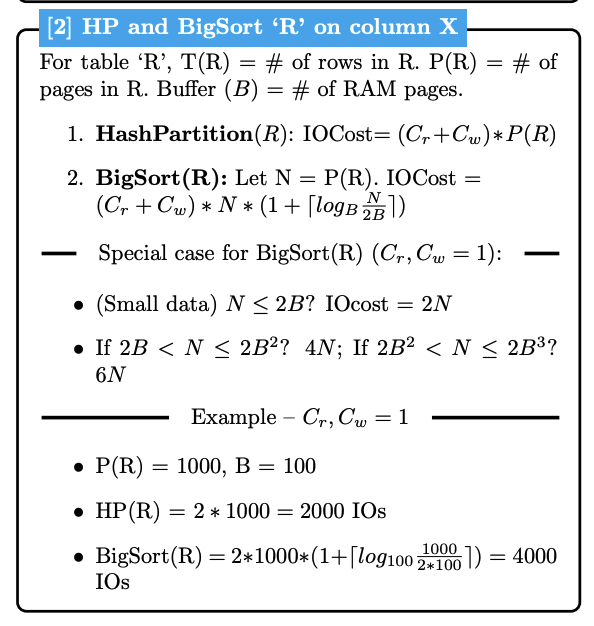
For detailed IO cost formulas, see IO Cost Reference.
BigSort vs Hash Partitioning: Cost Intuition
Hash Partitioning: Always 2N IOs
-
Single pass through data - read once, write once to partitions
-
Cost stays constant regardless of data size
BigSort: Variable cost - grows logarithmically
-
Multiple passes needed as data gets bigger
-
More data → more sorted runs → more merge passes required
-
Small data (fits in few runs): ~4N IOs
-
Large data (many runs): ~6N, 8N, 10N IOs...
Why the difference? Hash Partitioning distributes data in one shot, but BigSort must repeatedly merge until everything is sorted.
Key Takeaways
-
Divide and Conquer: Split large sorts into small sorts, then merge; Sort TB of data with GB of RAM
-
Scalable Cost: Works for any big data size with fixed RAM
-
Foundation of Big Data: This is how PostgreSQL, BigQuery, Spark handle ORDER BY