Case Study 3.2: How does Spotify support search on text?
How does Spotify support search on text?
Goal: Learn how to build indices on text data for fast text search.
When you type a song name into Spotify, it doesn't scan through millions of tracks one by one. Instead, it uses a specialized data structure called an Inverted Index.
The Problem: Scanning is Slow
Traditionally, searching involves scanning every document for a term. For a library of 100 million songs, checking the metadata (Title, Artist, Album) of every track for the word "Crazy" would be incredibly slow and resource-intensive.
The Solution: The Inverted Index
An inverted index works like the index at the back of a textbook. It's a dictionary-like structure where every term (word) is a key, and the value is a list of locations (track IDs or page numbers) where that word appears.
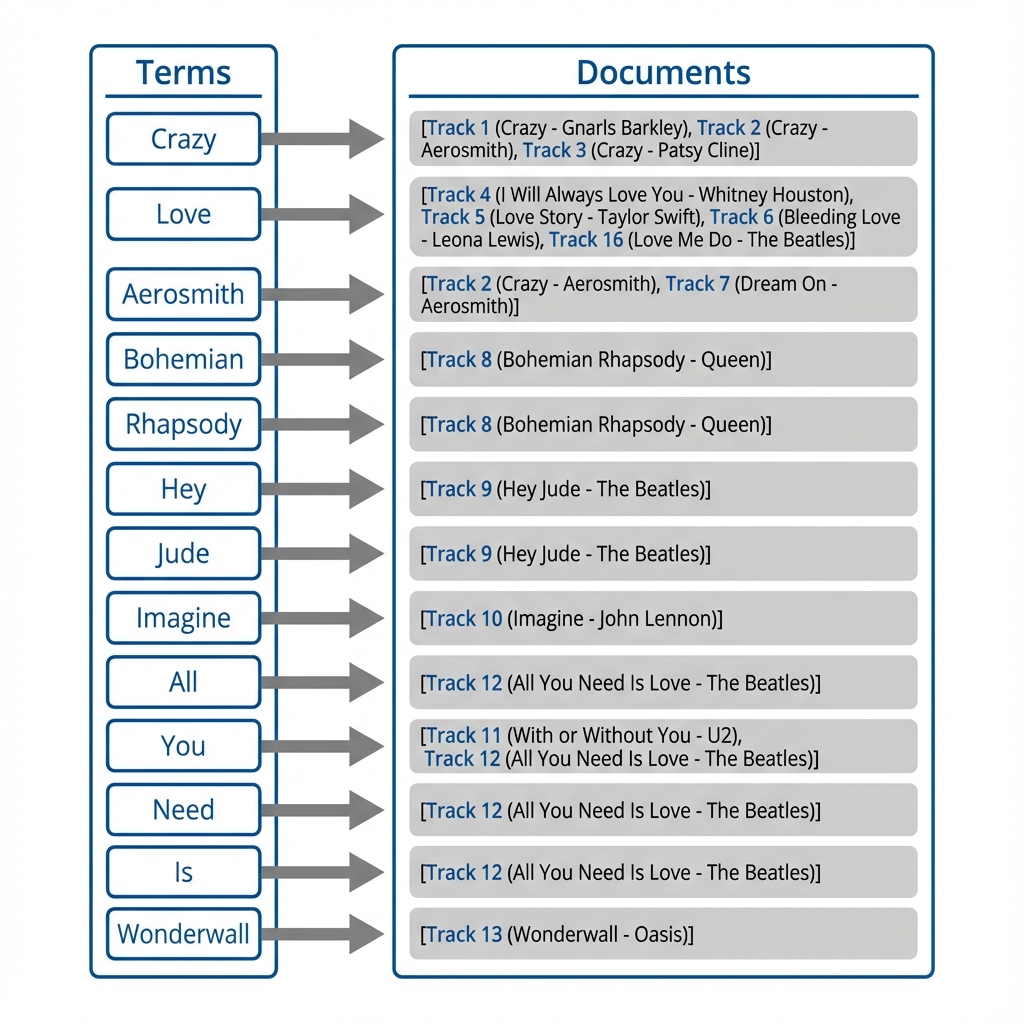
(Click image to view full size)
In our Songs database, let’s say we have hundreds of songs, and among them, there are 3 songs with ‘crazy’ in the titles. An inverted index is a dictionary-like structure where all the terms (e.g., "crazy") are associated with the list of songs that contain the term in their titles.
Python implementation: Search Engine with Whoosh
In this example, we use the Whoosh library to create an inverted index with a single field called "content".
Part 1: Building the Index
First, we define the schema and add song titles as documents.
from whoosh.fields import TEXT, Schema
from whoosh.index import create_in
import os, shutil

# 1. Define the index schema (what fields to index)
schema = Schema(content=TEXT(stored=True))

# 2. Create a directory for the index
if os.path.exists("singer_index"):
    shutil.rmtree("singer_index")
os.mkdir("singer_index")
ix = create_in("singer_index", schema)

# 3. Add songs as documents to the index
writer = ix.writer()
writer.add_document(content="Crazy - Aerosmith")
writer.add_document(content="Crazy in Love - Beyoncé")
writer.add_document(content="Crazy Love - Van Morrison")
writer.add_document(content="Love Story - Taylor Swift")
writer.commit()
Part 2: Searching the Index
Once the index is built, we can perform efficient lookups using a QueryParser.
from whoosh.qparser import QueryParser
from whoosh.index import open_dir

# 1. Open the existing index
ix = open_dir("singer_index")

# 2. Define queries to test
queries = ["crazy", "aerosmith", "crazy love"]

# 3. Search and print results
with ix.searcher() as searcher:
    parser = QueryParser("content", ix.schema)
    for q_str in queries:
        query = parser.parse(q_str)
        results = searcher.search(query)
        print(f"\nSearching for '{q_str}': Found {len(results)} results")
        for hit in results:
            print(f" -> {hit['content']}")

# Notice:
# - 'Crazy' finds 3 documents
# - 'Aerosmith' finds 1 document
# - 'Crazy Love' finds 2 documents (default AND logic)
Beyond Basic Search: Ranking & Expansion
Simple keyword matching is often not enough. Spotify employs advanced techniques to refine results:
-
Query Expansion: If you search for "happy", the system might also look for "joyful" or "cheerful" using synonyms to increase your chances of finding the right track.
-
Ranking: Not all results are equal. Spotify scores results based on:
- Match Quality: Does the term appear in the Title (high score) or just a Tag (lower score)?
- Popularity: Is this a global hit or a niche track?
- History: Have you listened to this artist before?
Takeaway: Inverted indices transform a massive search problem into a simple dictionary lookup, enabling instant access to millions of songs with just a few keystrokes.