IO Cost Summary: Comparing Query Plans
The Query
-- Highly recommended songs
SELECT r.song_id, COUNT(r.recommendation_id) AS recommendation_count
FROM Recommendations AS r
JOIN Listens AS l ON r.user_id = l.user_id AND r.song_id = l.song_id
GROUP BY r.song_id
ORDER BY COUNT(r.recommendation_id) DESC;
Query Plan #1: Sort-Merge Join
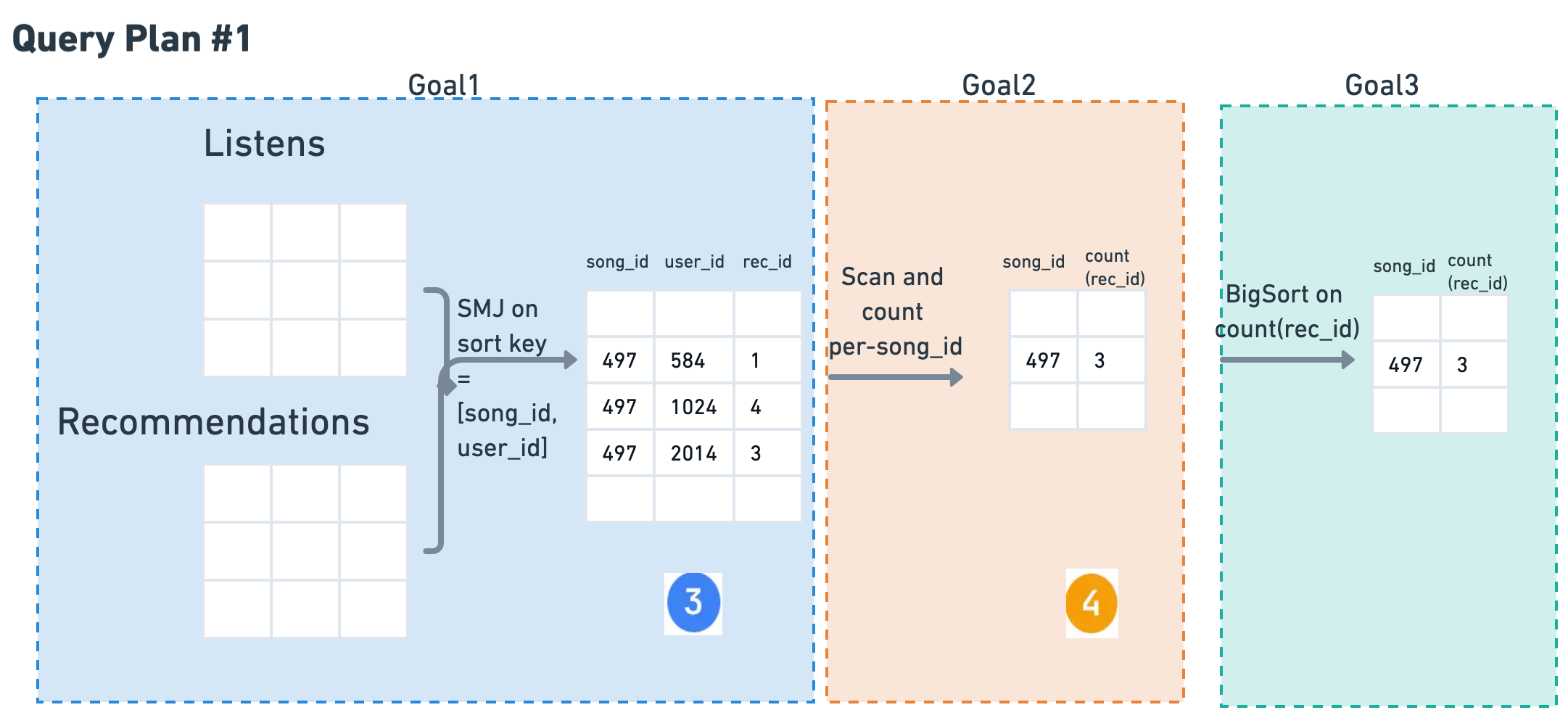
Goal #1: Join
Join R and L on
[song_id, user_id]
Cost: SMJ(R, L)
Goal #2: Group
GROUP BY song_id
Read 3, Write 4
Cost: C_r×P(3) + C_w×P(4)
Goal #3: Sort
ORDER BY count
Sort table 4
Cost: BigSort(4)
Total Cost of Plan #1:
SMJ(R, L) + C_r×P(3) + C_w×P(4) + BigSort(4)
Query Plan #2: Hash-Partition Join
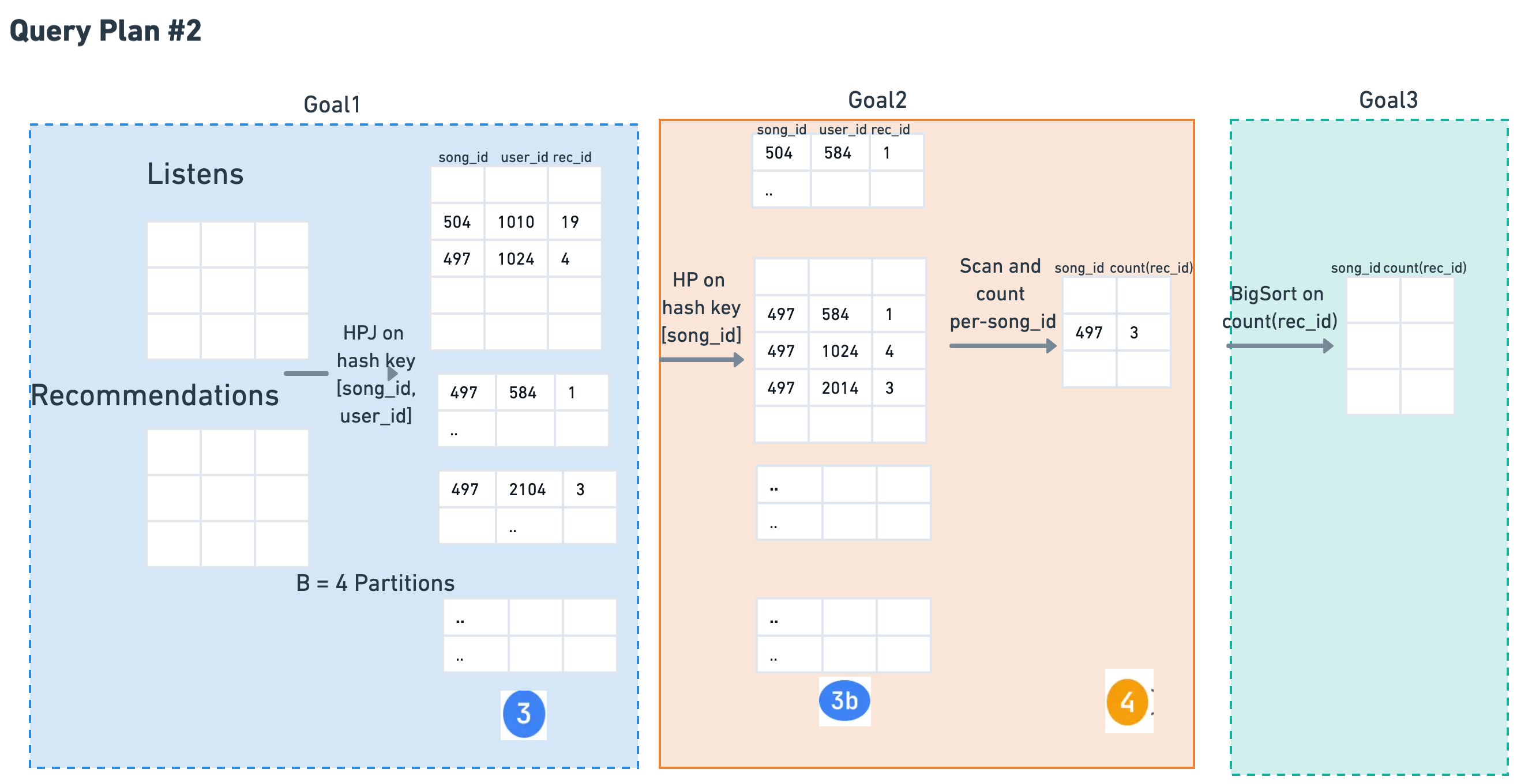
⚠️ Note: HPJ is on [song_id, user_id], so the output partitions (table ③) are based on both keys. Since GROUP BY is only on song_id, we need a second HP operation to repartition by song_id alone.
Goal #1: Join
Hash-Partition Join
[song_id, user_id]
Cost: HPJ(R, L)
Goal #2: Group
GROUP BY song_id only
HP on song_id to align partitions
HP 3, Read 3b, Write 4
Cost: HP(3)+C_r×P(3b)+C_w×P(4)
Goal #3: Sort
ORDER BY count
Sort table 4
Cost: BigSort(4)
Total Cost of Plan #2:
HPJ(R, L) + HP(3) + C_r×P(3b) + C_w×P(4) + BigSort(4)
Key Insights: Understanding the Query Plans
🔑 Why Different Sequences?
Plan #1: SMJ Approach
- SMJ produces sorted output on join keys
- Output already sorted by [song_id, user_id]
- Can directly GROUP BY song_id (prefix key)
- Only needs final BigSort for ORDER BY
Plan #2: HPJ Approach
- HPJ partitions on both [song_id, user_id]
- But GROUP BY needs only song_id
- Must repartition (HP) to align with GROUP BY
- Still needs BigSort for final ORDER BY
📌 Critical Observations
- Always check join keys vs GROUP BY keys: Mismatch requires repartitioning
- HP twice in Plan #2: First for join (both keys), second for grouping (single key)
- Both plans need final sort: ORDER BY count requires BigSort regardless
- Trade-off: SMJ has sort overhead upfront, HPJ has partition overhead midway
When to Use Which?
| Choose SMJ when... | Choose HPJ when... |
|---|---|
|
• Data is pre-sorted or easily sortable • Memory can hold sort buffers • Join keys align with GROUP BY keys |
• Data is unsorted and very large • Hash partitioning is more efficient • Willing to pay repartition cost |
Interactive Query Explainer
Example #3: The Optimizer's Choice
The Final Query Plan: What PostgreSQL Actually Chose
-- Popular songs based on number of listens
SELECT Songs.title, Songs.artist, COUNT(Listens.song_id) AS popular
FROM Songs
JOIN Listens ON Songs.song_id = Listens.song_id
GROUP BY Songs.title, Songs.artist
ORDER BY COUNT(Listens.song_id) DESC
LIMIT 10;
EXPLAIN Output
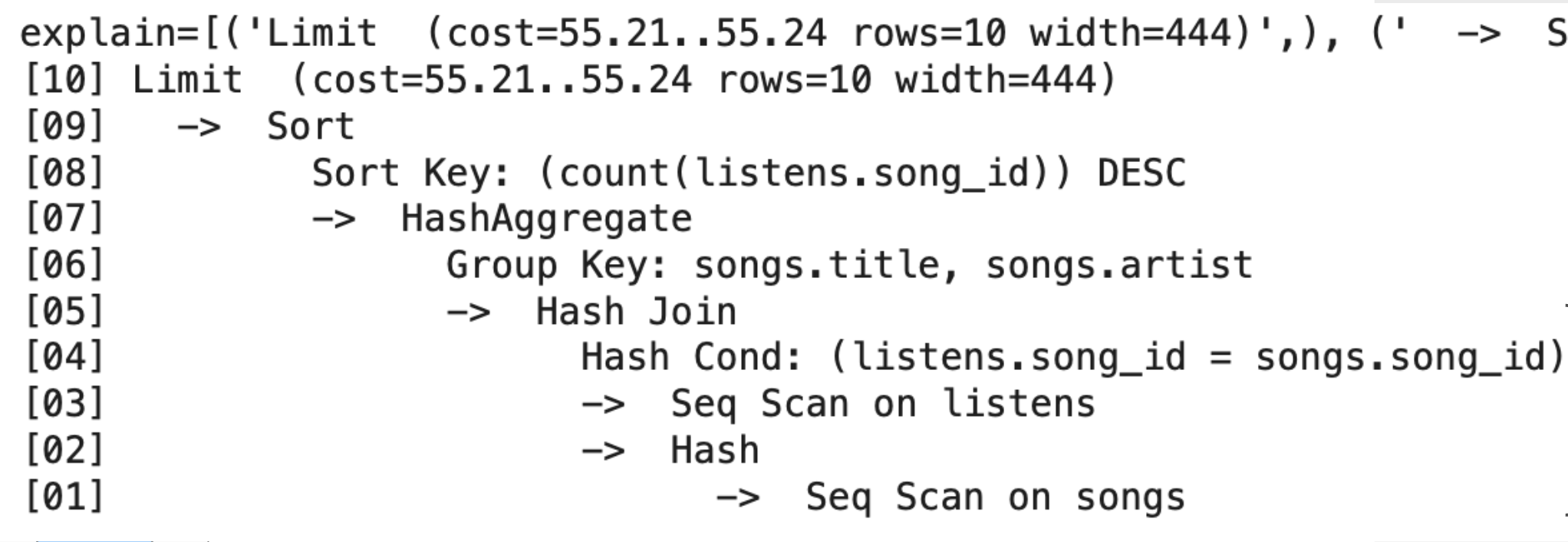
How to Read EXPLAIN and Calculate Costs
📖 Read Bottom-Up (Innermost First)
Cost Format
cost=startup..total
- startup: Cost before first row
- total: Cost for all rows
- rows: Estimated row count
Step-by-Step Cost Calculation
- [01] Seq Scan on songs
C_r × P(Songs)= Read base table - [02-03] Build Hash + Seq Scan listens
C_r × P(Listens)= Read second table - [04-05] Hash Join
HPJ(Songs, Listens)on song_id - [06-07] HashAggregate
HashAggfor GROUP BY (no sort needed!) - [08-09] Sort
BigSortfor ORDER BY count - [10] Limit
Negligible cost (just take 10 rows)
Mapping to Our IO Cost Formulas
| PostgreSQL Operation | Our Formula | Cost |
|---|---|---|
| Seq Scan (×2) | C_r × P(Songs) + C_r × P(Listens) |
Base scans |
| Hash Join | HPJ(Songs, Listens) |
Join cost |
| HashAggregate | Grouping cost |
Aggregation |
| Sort | BigSort(grouped_data) |
Sorting |
| Total | Sum of all operations | 55.24 units |
Understanding HashAggregate
HashAgg builds an in-memory hash table:
- Input: Full table scan
- Output: One row per group (usually much smaller!)
- IO Cost: C_r×P(input) - no sorting needed
- If spills: Becomes partition-based like HPJ
Why Did PostgreSQL Choose This Plan?
- Hash Join chosen: More efficient than SMJ for unsorted data
- HashAggregate used: Can group without sorting (unlike our simplified model)
- Only one BigSort: Just for the final ORDER BY
- Total cost 55.24: Optimizer estimated this as cheapest plan
- Lesson: Real optimizers have more tricks (HashAgg vs sort-based grouping)
Common EXPLAIN Operations Reference
| Operation | What it does | IO Cost | Output Rows | Output Size |
|---|---|---|---|---|
| Sort | Order rows | BigSort cost |
Same as input | = input |
| WindowAgg | ROW_NUMBER, RANK, etc | C_r×P(input) + sort |
Same as input | Slightly larger (extra cols) |
| CTE Scan | Reads WITH result | C_r×P(CTE) |
= CTE rows | = CTE size |
| Subquery Scan | Reads subquery | C_r×P(subquery) |
= subquery rows | = subquery size |
| Index Scan | Uses index | Log(N) + rows |
Filtered rows | ≪ input |
| Hash Join | Build hash, probe | P(R) + P(S) |
Join matches | Varies |
| HashAggregate | Groups using hash table | C_r×P(input) |
One per group | ≪ input |
| Materialize | Cache in memory | C_w + n×C_r |
Same as input | = input |