Lock Scheduling Examples: See It In Action
Interactive Examples & Performance Analysis 📊
These examples show how locking protocols work in practice, demonstrating the trade-offs between correctness, concurrency, and performance.
Example 1: Interleaved Execution Speedup 🚀
The Performance Gain from Concurrency
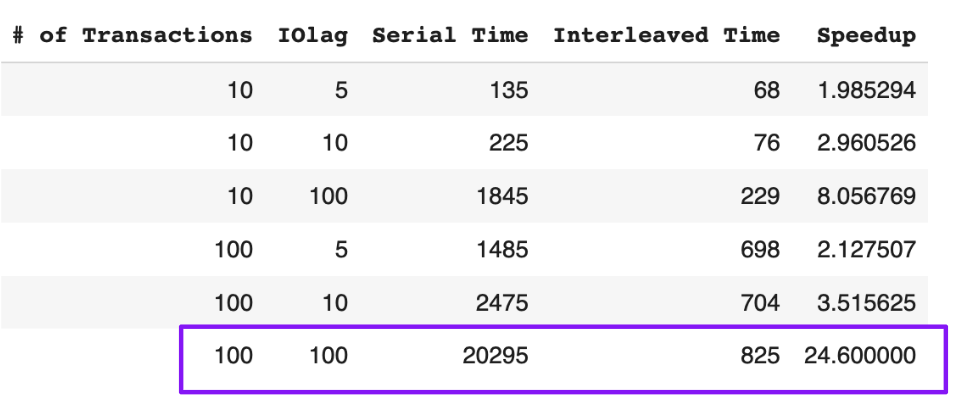
This diagram illustrates the dramatic performance improvement from allowing concurrent execution vs. serial execution. The key insight: when transactions access different data, they can run in parallel without conflicts.
Serial vs. Concurrent Execution
🐌 Serial Execution
Total Time: T1 + T2 + T3 = 150ms

T1: [50ms] ████████████
T2:        [50ms] ████████████
T3:               [50ms] ████████████

Result: 150ms total, 1 CPU utilized
Problem: CPU and I/O resources are underutilized most of the time.
⚡ Concurrent Execution
Total Time: max(T1, T2, T3) = 50ms

T1: [50ms] ████████████
T2: [50ms] ████████████
T3: [50ms] ████████████

Result: 50ms total, 3x speedup!
Benefit: All transactions run simultaneously when they don't conflict.
Example 2: Micro-Scheduling Scenarios 🔬
Complex Lock Interactions
MicroSched Example 2: Read-Write Conflicts
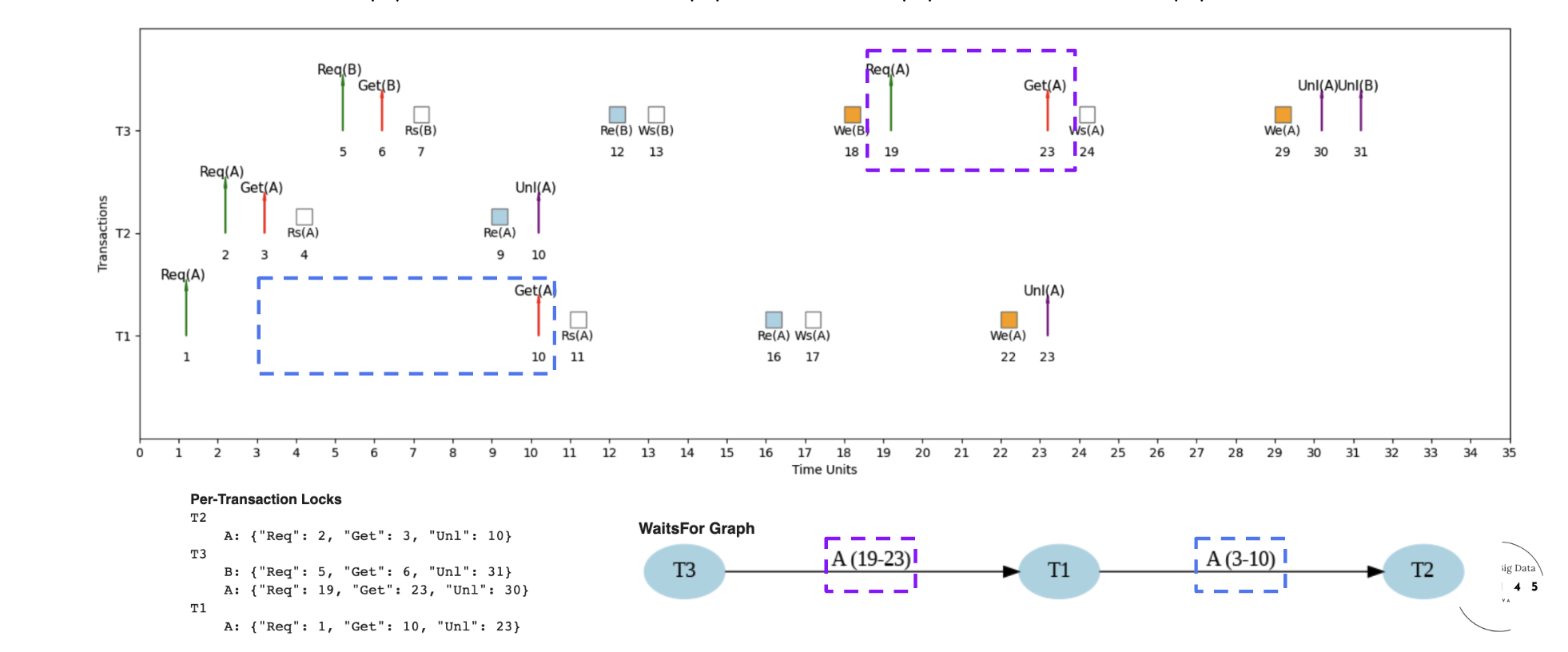
Scenario: Transaction T1 wants to read data that T2 is writing
- T2 holds X-lock on data item A
- T1 requests S-lock on data item A
- T1 must wait until T2 releases X-lock
- Lock manager queues T1's request
MicroSched Example 3: Write-Write Conflicts
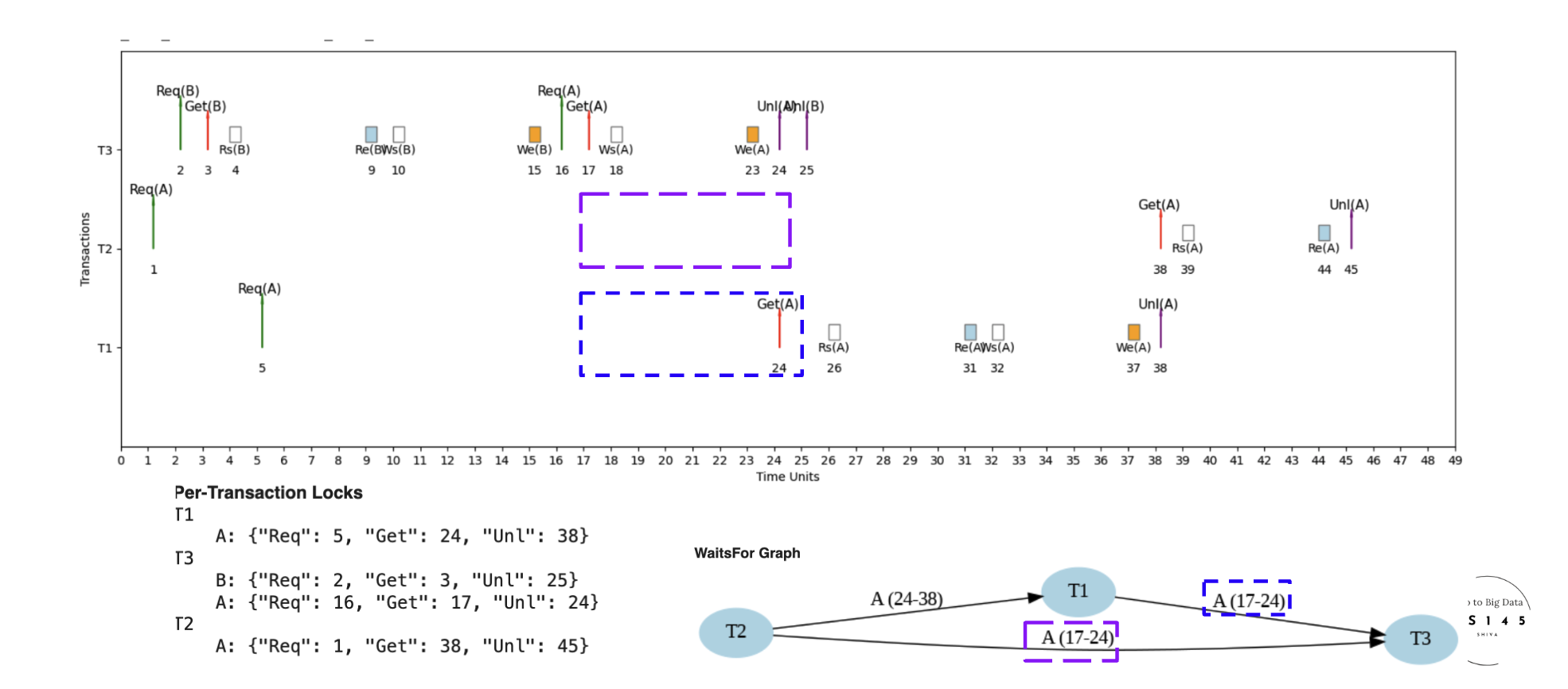
Scenario: Two transactions want to write the same data
- T1 holds X-lock on data item B
- T2 requests X-lock on data item B
- T2 must wait for T1 to complete
- Ensures no lost updates or inconsistent writes
MicroSched Example 5: Complex Dependencies
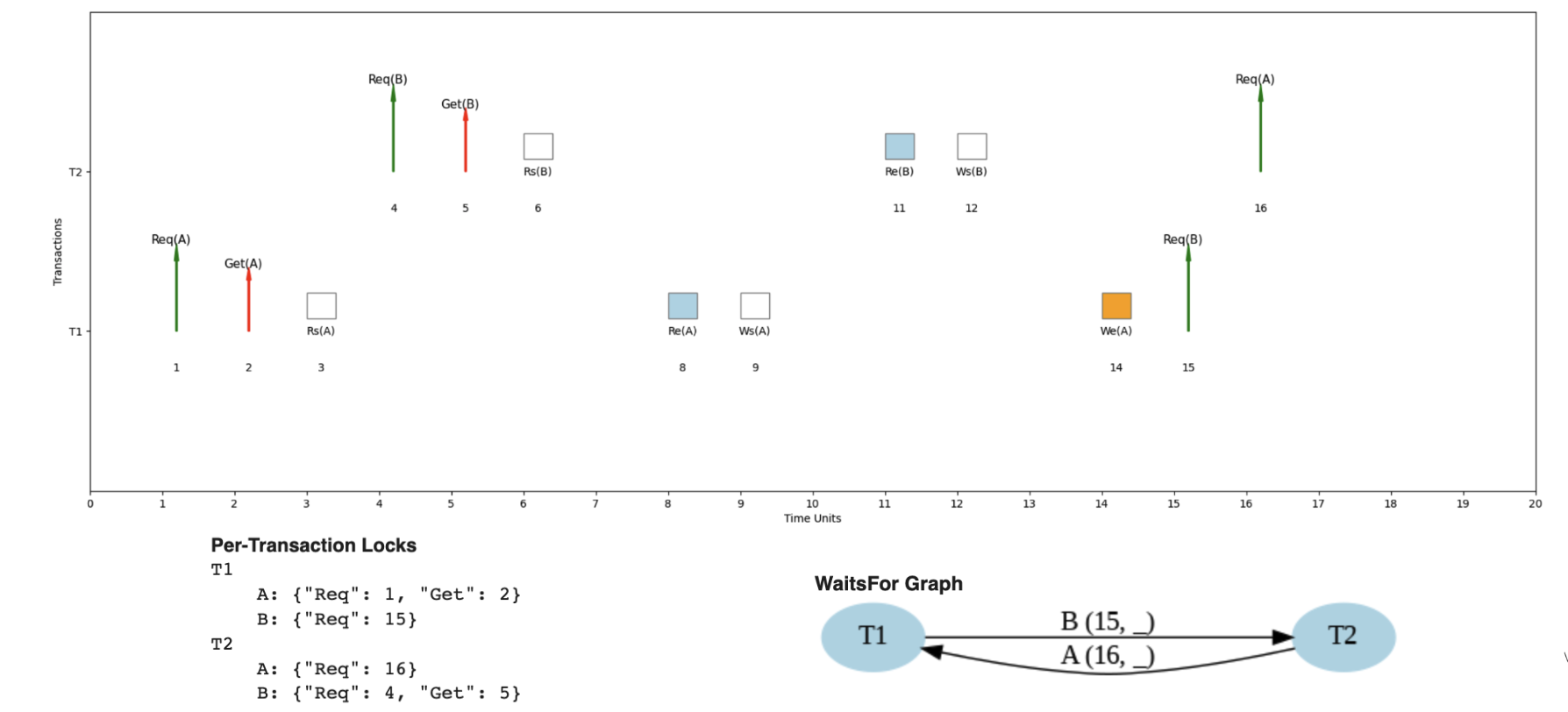
Scenario: Chain of dependencies across multiple transactions
- T1 → T2 → T3 dependency chain
- Each transaction waits for the previous one
- Demonstrates how conflicts can serialize execution
- Shows importance of minimizing lock holding time
Example 3: Three Transactions, Two Cores ⚙️
Resource Contention Analysis
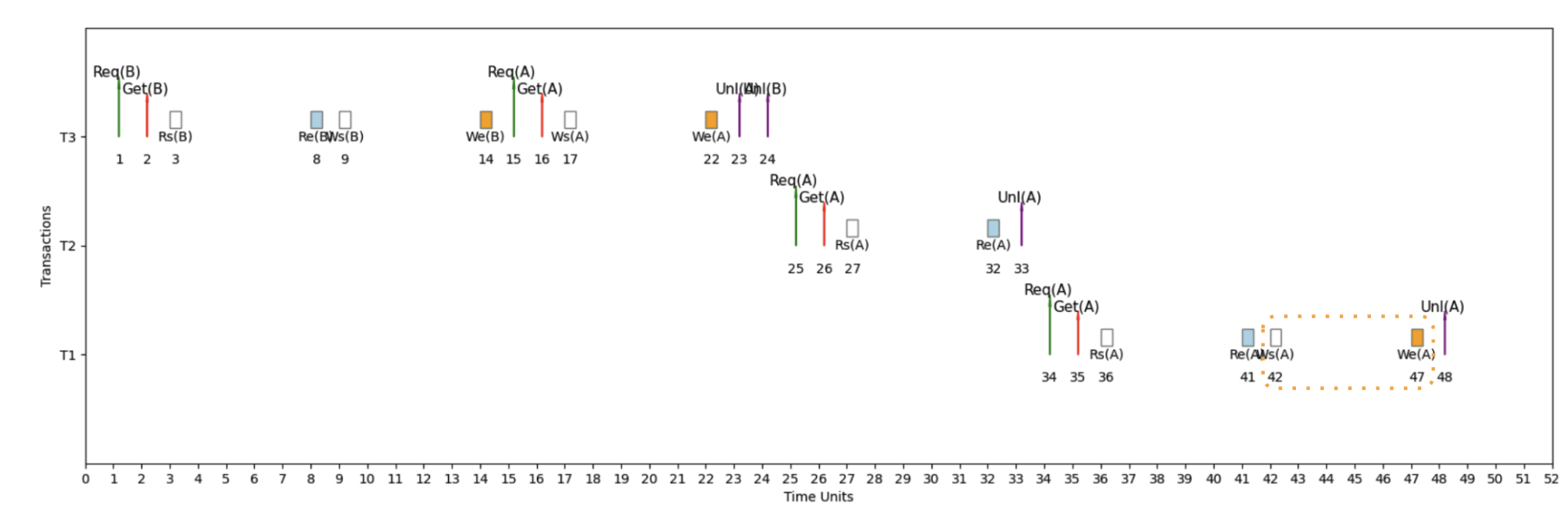
Key Insights from 3T2C Scenario:
🎯 Parallelism Limits
Even with perfect scheduling, you can't run more transactions simultaneously than you have CPU cores
🔄 Context Switching
When a transaction blocks on a lock, the CPU core can switch to another ready transaction
⚖️ Load Balancing
Lock manager must balance load across available cores while respecting lock dependencies
🕐 Wait Time Optimization
Smart scheduling minimizes overall wait time by choosing which transactions to run on which cores
Example 4: Request-Grant-Unlock Cycle 🔄
The Complete Lock Lifecycle
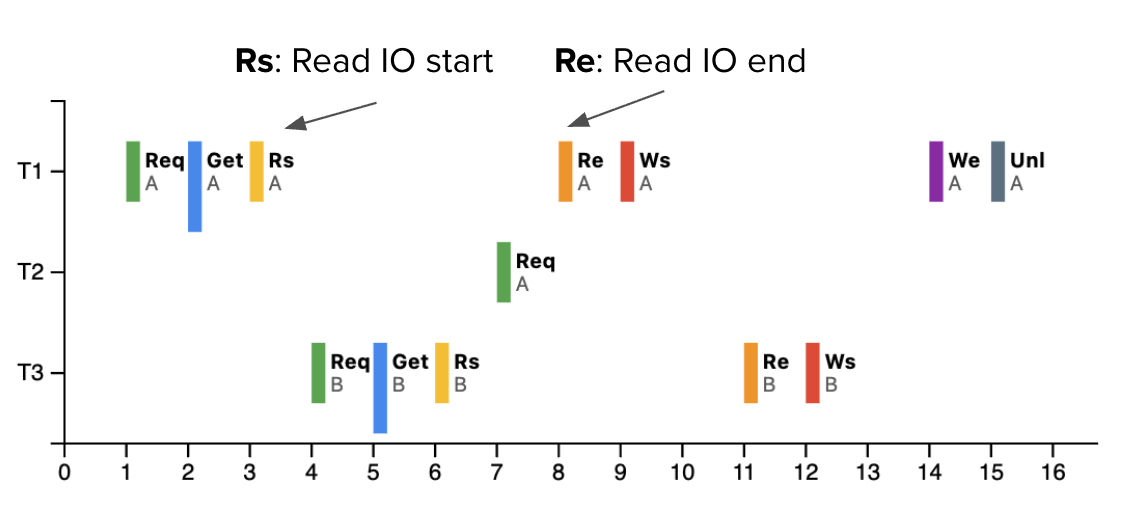
Step-by-Step Breakdown
1️⃣ Request Phase
- Transaction sends lock request to Lock Manager
- Specifies data item and lock type (S or X)
- Request enters lock queue if conflicts exist
LOCK_REQUEST(Transaction_ID, Data_Item, Lock_Type)
2️⃣ Grant Phase
- Lock Manager checks compatibility matrix
- Grants lock if no conflicts exist
- Transaction can proceed with data access
LOCK_GRANTED → Transaction proceeds
3️⃣ Unlock Phase
- Transaction releases lock when done
- Lock Manager updates lock table
- Queued transactions may now be granted locks
UNLOCK(Data_Item) → Wake up waiting transactions
Real-World Scenario: Banking System 🏦
Multi-User Account Transfer
Let's trace through a realistic banking scenario with multiple concurrent transfers:
-- Three simultaneous transfers happening:
-- T1: Transfer $100 from Alice to Bob
-- T2: Transfer $50 from Bob to Charlie
-- T3: Transfer $200 from Charlie to Alice
Timeline Analysis
Time 0ms: All transactions start
LOCK_X(Alice) ✅ Granted
LOCK_X(Bob) ✅ Granted
LOCK_X(Charlie) ✅ Granted
Time 5ms: Second lock requests
LOCK_X(Bob) ⏳ Waits for T2
LOCK_X(Charlie) ⏳ Waits for T3
LOCK_X(Alice) ⏳ Waits for T1
Time 6ms: Deadlock resolution
Victim Selection: T3 (newest transaction)
Action: Abort T3, release LOCK_X(Charlie)
Result: T2 can now proceed, then T1
Final execution order:
- T2 completes: Bob → Charlie transfer
- T1 completes: Alice → Bob transfer
- T3 restarts and completes: Charlie → Alice transfer
Performance Metrics Analysis 📈
Measuring Lock Effectiveness
🚀 Throughput
⏱️ Average Response Time
💀 Deadlock Rate
🔒 Lock Utilization
Performance Tuning Insights
🎯 Hotspot Analysis
Identify frequently accessed data items that become bottlenecks
- Monitor lock wait times per data item
- Consider data partitioning for hot records
- Use read replicas for read-heavy workloads
⏰ Lock Duration Optimization
Minimize time transactions hold locks
- Keep transactions short and focused
- Avoid user interaction within transactions
- Prefetch data to reduce I/O within transactions
🔄 Retry Strategy
Handle deadlocks gracefully with smart retry logic
- Exponential backoff to reduce retry storms
- Randomized delays to break timing patterns
- Circuit breakers for persistent deadlock scenarios
Interactive Exercise: Design Your Own Schedule 🧩
Challenge: Optimize This Workload
Given these transactions, design an optimal execution schedule:
T1: UPDATE accounts SET balance = balance - 100 WHERE id = 1;
    UPDATE accounts SET balance = balance + 100 WHERE id = 2;

T2: SELECT SUM(balance) FROM accounts WHERE id IN (1,2,3);

T3: UPDATE accounts SET balance = balance - 50 WHERE id = 2;
    UPDATE accounts SET balance = balance + 50 WHERE id = 3;

T4: SELECT * FROM accounts WHERE id = 1;
📝 Analysis Questions:
- Which transactions can run concurrently?
- What locks does each operation need?
- Where might deadlocks occur?
- How would you optimize the schedule?
💡 Hint:
T2 and T4 only need shared locks for reading. T1 and T3 both need exclusive locks on account 2 - they cannot run concurrently!
Key Takeaways 🧠
🎯 What You've Learned
- Concurrency = Speed: Parallel execution can provide massive speedups
- Conflicts = Serialization: Lock conflicts force transactions to wait
- Deadlocks = Reality: They happen in practice and must be handled gracefully
- Performance Tuning: Monitor metrics and optimize transaction design
- Trade-offs Matter: Balance correctness, performance, and complexity
What's Next? 🔜
You've mastered the fundamentals of locking! Continue your journey:
-
Lock Foundations - Review the basic concepts
-
Two-Phase Locking - Understand the core protocol
-
Deadlock Handling - Master deadlock detection and prevention
-
Isolation Levels - Explore transaction isolation trade-offs