UNDO and REDO: Building blocks for transactions to COMMIT or ABORT ⚡
Every database recovery system is built on two fundamental operations:
↩️ UNDO Operation
Purpose: Reverse a change, restore original value
Uses old_value: Set variable back to what it was before
When: Transaction aborts or needs to be rolled back
UNDO: seat_id=42, buyer_id: zx198 → ab12
↪️ REDO Operation
Purpose: Re-apply a change, set new value
Uses new_value: Set variable to the updated value
When: Transaction commits or needs to be re-applied after crash
REDO: seat_id=42, buyer_id: ab12 → zx198
UNDO/REDO in Action
Let's see how this works with our ticket resale transaction:
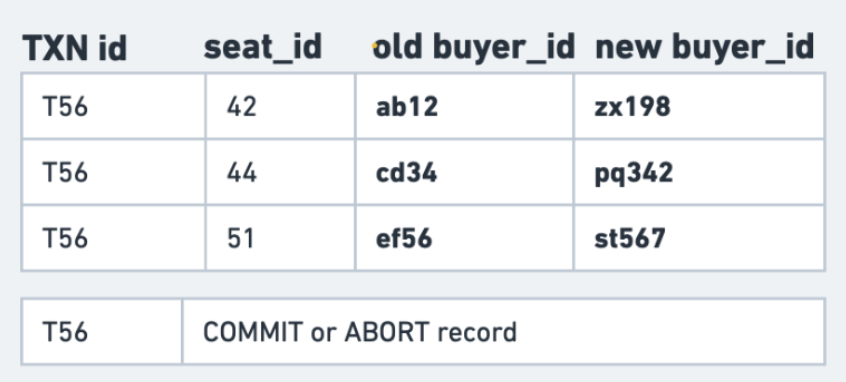
Key insights from T56's log entries:
-
Each row change is logged with both
oldandnew -
UNDO uses the old values to revert
-
REDO uses the new values to reapply changes
-
The final COMMIT/ABORT record determines what happens
The COMMIT vs ABORT Decision 🤔
✅ COMMIT Path
-- Transaction T56 succeeds
UPDATE Seats SET buyer_id = 'zx198' WHERE seat_id = 42;
UPDATE Seats SET buyer_id = 'pq342' WHERE seat_id = 44;
UPDATE Seats SET buyer_id = 'st567' WHERE seat_id = 51;
COMMIT;
Result: All changes become permanent - Use REDO operations to ensure durability - Changes visible to other transactions
❌ ABORT Path
-- Transaction T56 encounters error
UPDATE Seats SET buyer_id = 'zx198' WHERE seat_id = 42;
UPDATE Seats SET buyer_id = 'pq342' WHERE seat_id = 44;
-- ERROR: Payment failed!
ABORT;
Result: All changes are reversed - Use UNDO operations to restore original state - Database returns to start state