Write-Ahead Logging (WAL) 📋
🎯 The logging system
Write-Ahead Logging tracks every change to DB in four synchronized states: WAL log, RAM log, RAM state, and durable DB state.
Understanding the Three States 🔄
Every database operation affects three synchronized states:
📝 WAL Log (Write-Ahead Log)
🔥 RAM State + RAM Log (Volatile)
💾 DB State (Durable)
💡 Intuition: Collaborative Google Docs
Every keystroke → 200ms round trip = terrible lag!
Solution: Edit locally, sync periodically
📝 Google's Revision History = WAL Log
• Tracks EVERY change for weeks
• "Changed 'affect' to 'effect' at 10:32am by Alice"
• Can revert any change, even months later
🖥️ Your Browser = RAM Log + RAM State
• What you see = RAM State (current document)
• Super fast, but lost if browser crashes
• Limited history (last 100 edits)
☁️ Published Doc = DB State
• Auto-saved every 30 seconds
• May lag behind your edits
• Survives crashes, always available
The partial update problem: After editing for hours (thousands of changes), your browser can't hold infinite undo history. Google must sync some changes to cloud even though you're still typing - exactly like databases flushing to disk during long transactions!
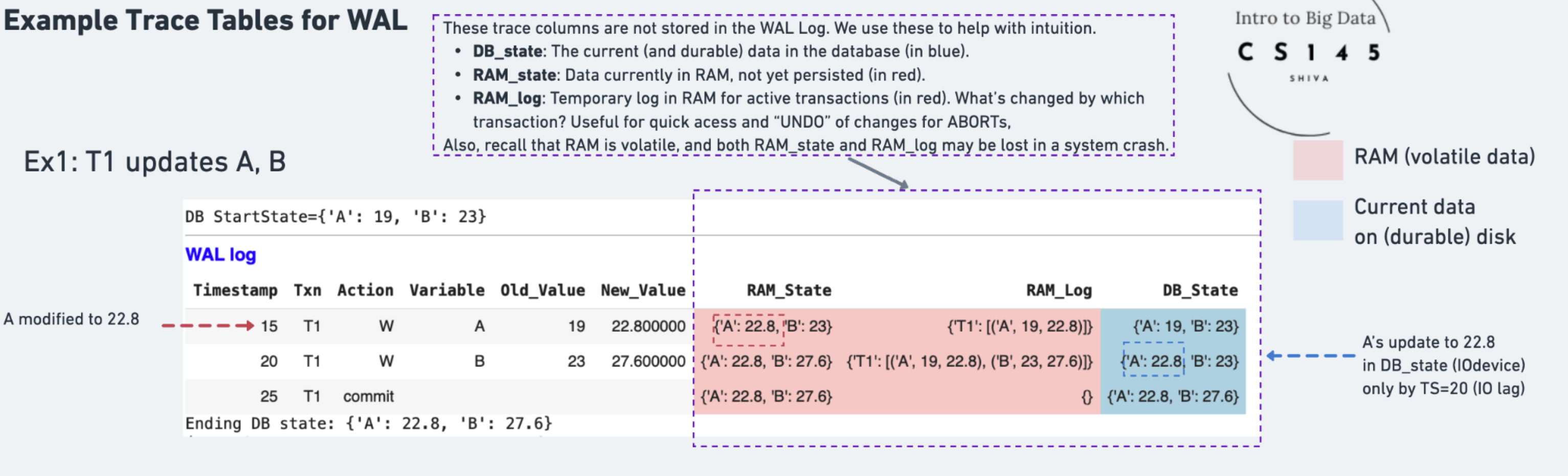
Simple WAL Trace Table: T1 Updates A and B
Example: T1 increases A and B by 20%.
📖 How to Read the Trace
Example: 'A' changes to 22.8 at timestamp (TS)=15
Example: 'A' is reflected in DB only at TS=20
Example: At TS=15, WAL logs "A: 19→22.8 by T1"
⚡ Performance Benefits
Example: "A: 19→22.8, B: 23→27.6, C: 17→20.4..." all go to the SAME log page
Without WAL: Must read page 17 (has A), page 492 (has B), page 1038 (has C)...
Later: Batch apply all changes to their actual pages when convenient
🔄 Recovery Capability
Why WAL's WAL Log is Special: Instantaneous AND Durable
Hardware optimizations make this possible:
- NVRAM (Non-Volatile RAM): Special (more expensive) battery-backed RAM that survives power loss - writes at RAM speed, durability of disk
- Replicated RAM: Write to RAM on 3+ machines simultaneously - if one crashes, others have the data
- Sequential SSD writes: Modern SSDs excel at sequential appends - 100x faster than random writes
The key insight: WAL transforms random updates into sequential appends - the ONE operation that all hardware does blazingly fast!
Long-Running Transaction Challenge 🏃♂️
What happens when transactions are too big to fit in RAM?

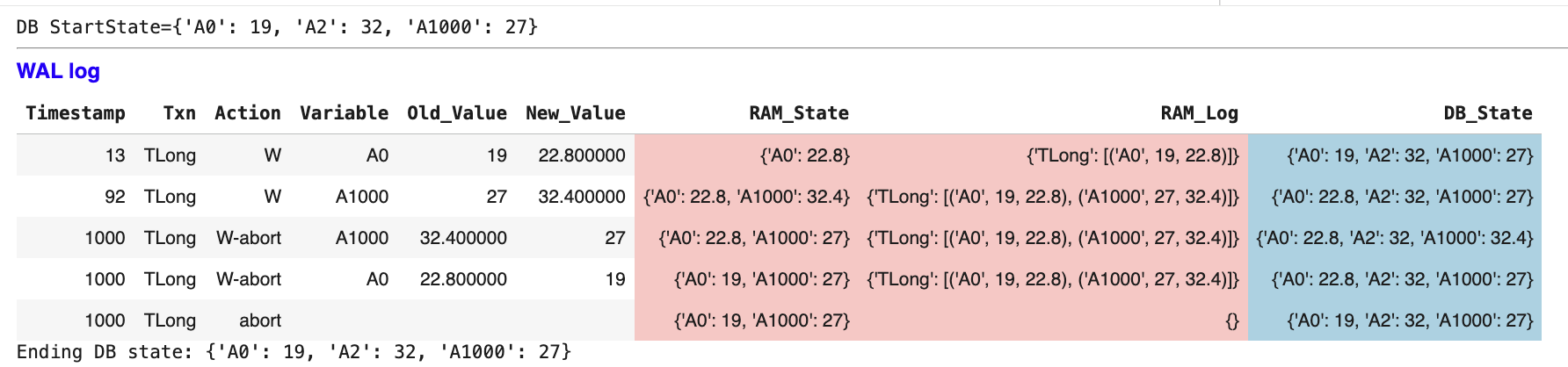
The problem: TLong updates A1, A2, ..., A1000 but RAM can't hold all changes!
⚠️ Memory Pressure
ABORT Scenario: Undoing Long Transactions ❌
What if TLong needs to abort after 1000 updates? [For simplicity, we’ll show ABORTs happening at one time unit. In reality, they’d also span multiple time units.]
ABORT process:
-
W-abort entries: Log UNDO operations for each change
-
Use old_values: A0: 22.8→19, A1000: 32.4→27
-
Update DB_state: Restore original values
-
Final abort record: Transaction officially cancelled
🔄 UNDO Process
WAL Protocol Rules 📋
The Write-Ahead Logging protocol ensures recovery correctness:
🔒 WAL Rules
- Log before data: WAL entry written before any data change
- Force log on commit: All log entries must be durable before COMMIT
- UNDO from log: Use old_values to reverse changes
- REDO from log: Use new_values to re-apply changes
🎯 Recovery Benefits
- Crash safety: Can reconstruct any state from log
- Performance: Changes can happen in fast RAM first
- Flexibility: Support both COMMIT and ABORT operations
- Auditability: Complete history of all database changes